How to enable Public and Private CDN in SharePoint Online
You can choose to have both public or private origins for your organization. Most organizations will choose to implement a combination of the two.
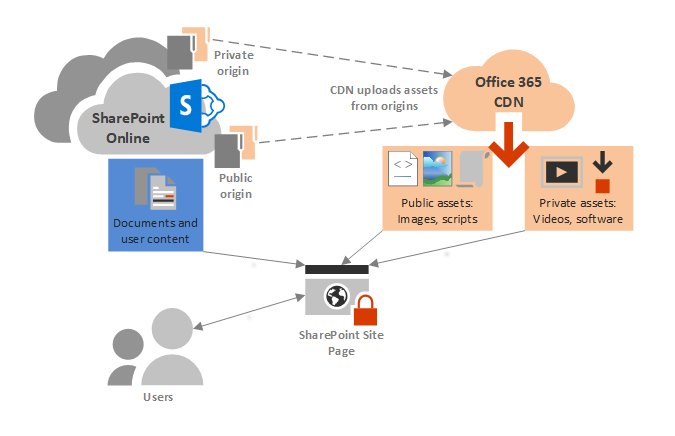
HOW TO ENABLE PUBLIC AND PRIVATE CDN IN SHAREPOINT ONLINE? Before you make changes to the tenant CDN settings, you should verify that it meets compliance, security and privacy policies of your organization The Office 365 CDN is separated into two basic types: Public CDN is designed to be used for JS (JavaScript), CSS (StyleSheets), Web Font File (WOFF, WOFF2) and non-proprietary images like company logos. Private CDN is designed to be used for images (PNG, JPG, JPEG, etc.). Steps: // Connect to your tenant using the SharePoint Online Management Shell: Connect-SPOService -Url https://&...
Canonical URL: https://khangkhuiphungdhar.vercel.app/read/how-to-enable-public-and-private-cdn-in-sharepoint-online